Documents
This page describes the APIs Onshape provides for working with documents.
ℹ️ Onshape API Notes
- All Onshape API calls must be properly authenticated.
- For Enterprise accounts, replace
cadin URLs with your company domain. - Onshape IDs are written as:
{did}, {wvmid}, {eid}, {pid}, {otherId}. See Onshape API Intro for information on what these IDs mean and how to obtain them from your documents. - Variables for replacement are written as:
{variable1}or<variableTwo>. Never include the braces or angle brackets themselves with these variables. - Visit the Learning Center's Intro to the Onshape API course for additional instruction and videos.
Examples
See all Document endpoints here: https://cad.onshape.com/glassworks/explorer/#/Document
Create a document
Create a new Onshape document named myDocument.
Endpoint
Request Body
{
  "name": "myDocument"
}
Additional optional fields available. See the API Explorer for a full list.
Example
Make sure you are logged into your Onshape account, and then call the createDocument endpoint. In this example, we set the new document name as myDocument.
curl -X 'POST' \
  'https://cad.onshape.com/api/v10/documents' \
  -H 'Accept: application/json;charset=UTF-8; qs=0.09' \
  -H 'Authorization: Basic {credentials}' \
  -H 'Content-Type: application/json;charset=UTF-8; qs=0.09'  \
  -d '{
        "name": "myDocument"
      }'
import requests
import json

auth = (access_key, secret_key) # See Authentication guide
headers = {
  'Accept': 'application/json;charset=UTF-8;qs=0.09',
  'Content-Type': 'application/json;charset=UTF-8; qs=0.09'
}

api_url = "https://cad.onshape.com/api/v10/documents/"
queryParams = {}
body = {
  "name": "myDocument"
}

response = requests.post( api_url,
                          params=queryParams,
                          json=body,
                          auth=auth,
                          headers=headers )
print(json.dumps(response.json(), indent=4))
The new document is created in your Onshape account; the new document ID ({did}) is returned in the response body and appears in the new document’s URL.
Get a document by ID
Search for this public document by document ID (e60c4803eaf2ac8be492c18e).
Endpoint
Example
- Call the getDocument endpoint on the document ID of this public document:
e60c4803eaf2ac8be492c18e.curl -X 'GET' \ 'https://cad.onshape.com/api/v10/documents/e60c4803eaf2ac8be492c18e' \ -H 'Accept: application/json;charset=UTF-8; qs=0.09' \ -H 'Authorization: Basic {credentials}' \ -H 'Content-Type: application/json;charset=UTF-8; qs=0.09'import requests import json auth = (access_key, secret_key) # See Authentication guide headers = { 'Accept': 'application/json;charset=UTF-8;qs=0.09', 'Content-Type': 'application/json;charset=UTF-8; qs=0.09' } api_url = "https://cad.onshape.com/api/v10/documents/e60c4803eaf2ac8be492c18e" queryParams = {} response = requests.get(api_url, params=queryParams, auth=auth, headers=headers) print(json.dumps(response.json(), indent=4)) - Scroll to the end of the response and confirm that it matches the information below:
{
  ...
  "name": "Onshape API Guide",
  "id": "e60c4803eaf2ac8be492c18e",
  "href": "https://cad.onshape.com/api/v10/documents/e60c4803eaf2ac8be492c18e"
}
Get documents by search criteria
ℹ️ NOTE
The Onshape API enables you to search for documents in the same way as the Onshape UI. The filter query parameter corresponds to the search options on the Documents page in the Onshape UI:
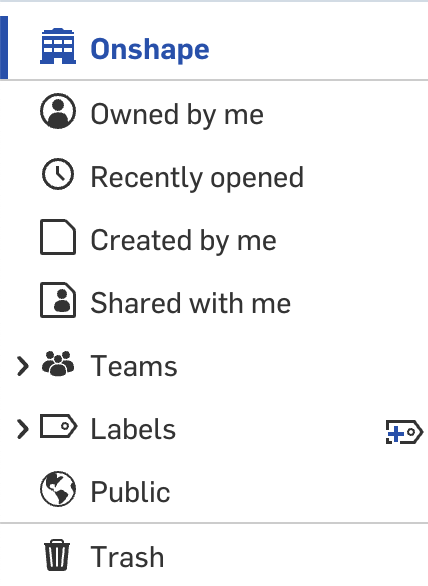
You can filter your results to only include Public documents, documents owned by your company, documents you created, etc. The other query parameters available will sort your results, not filter them. The best matches will appear first, followed by partial matches.
To combine multiple filters (for example, all public documents owned by your company), you should filter for one criteria (i.e. "filter": 7 && "ownerId": {ownerId} to retrieve all documents owned by your company), then programmatically remove all results that are not public.
Search for this public document by name ("Onshape API Guide") and owner ID (629677dbd020f032bea73ef7). Return 1 result in the list.
Endpoint
Query Parameters
{
  "q": "Onshape API Guide",
  "filter": 7,
  "owner": "{ownerId}",
  "ownerType": 1,
  "sortColumn": "createdAt",
  "sortOrder": "desc",
  "offset": 0,
  "limit": 1
}
Additional optional fields available. See the API Explorer for a full list.
Example
- Make sure you’re logged into your Onshape account, and then form the search query for your call. In this example, we want to locate the Onshape-owned
Onshape API Guidedocument. We only want to return this one document. - Call the getDocuments endpoint:
curl -X 'GET' \
'https://cad.onshape.com/api/v10/documents?q=Onshape%20API%20Guide&filter=7&owner=629677dbd020f032bea73ef7&ownerType=1&sortColumn=createdAt&sortOrder=desc&offset=0&limit=1' \
  -H 'Accept: application/json;charset=UTF-8; qs=0.09' \
  -H 'Authorization: Basic {credentials}' \
  -H 'Content-Type: application/json;charset=UTF-8; qs=0.09'
import requests import json auth = (access_key, secret_key) # See Authentication guide headers = { 'Accept': 'application/json;charset=UTF-8;qs=0.09', 'Content-Type': 'application/json;charset=UTF-8; qs=0.09' } api_url = "https://cad.onshape.com/api/v10/documents" queryParams = { "q": "Onshape API Guide", "filter": 7, # search by company owner "owner": "629677dbd020f032bea73ef7", # owner company ID "ownerType": 1, # company owned "sortColumn": "createdAt", "sortOrder": "desc", "offset": 0, "limit": 1 } response = requests.get(api_url, params=queryParams, auth=auth, headers=headers) print(json.dumps(response.json(), indent=4)) - In the response, one
itemshould be returned. Scroll to theownerblock and confirm that the owner name is"Onshape Training Repo"."owner": { "type": 1, "isEnterpriseOwnedResource": false, "image": null, "name": "Onshape Training Repo", "id": "629677dbd020f032bea73ef7", "href": "https://cad.onshape.com/api/v10/companies/629677dbd020f032bea73ef7" }
Update document attributes
Make a copy of this public document, and change the name of the new document to My API Doc.
Endpoint
Request Body
{
  "name": "My API Doc",
  "description": "Update document description here."
}
Additional optional fields available. See the API Explorer for a full list.
Example
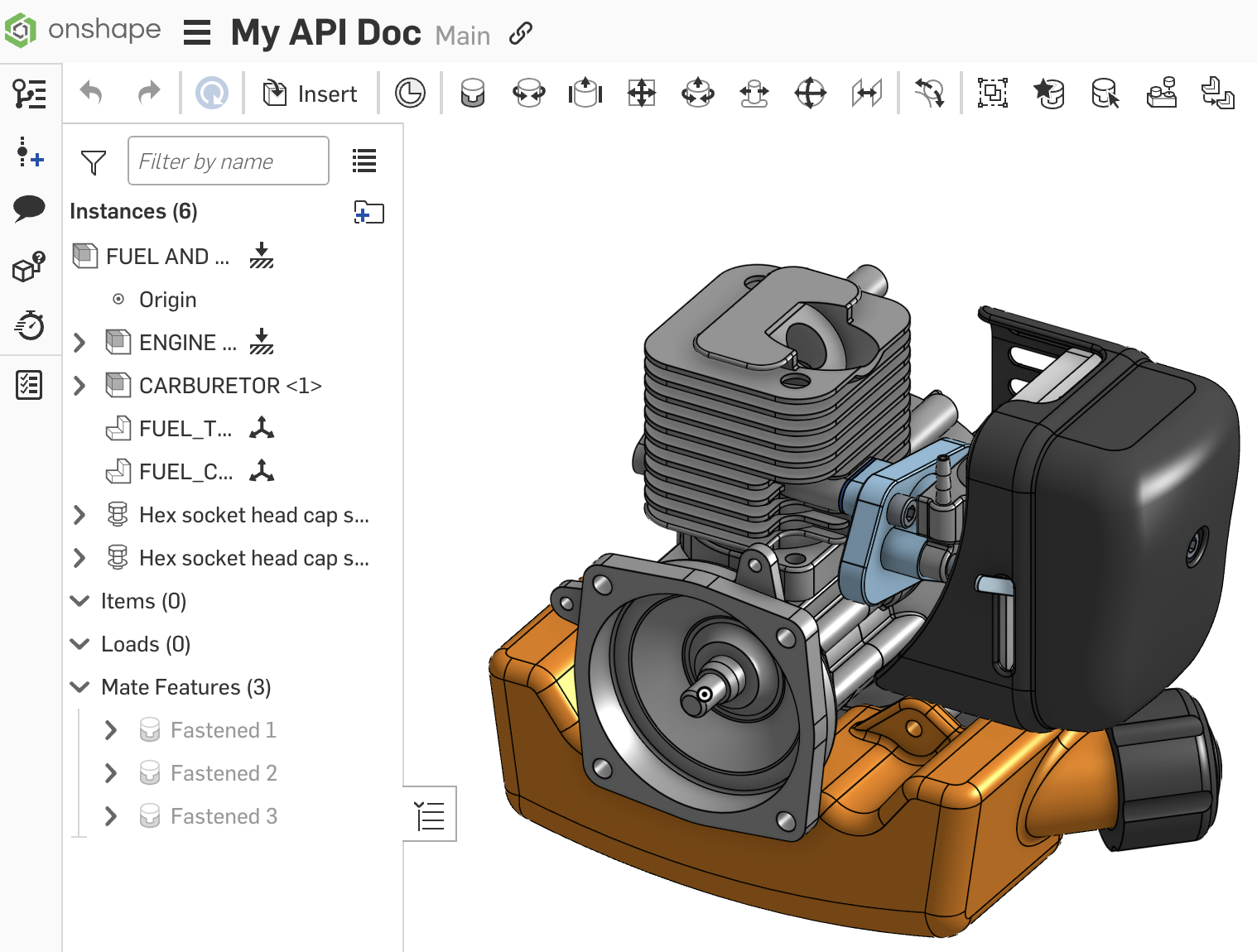
- Make a copy of this public document, and make a note of the new document ID in the URL.
- In this example, we’ll change the document name from
Onshape API Guide - CopytoMy API Doc. - Call the updateDocumentAttributes on new document ID from Step 1. Specify the new document name in the request body.
curl -X 'POST' \
  'https://cad.onshape.com/api/v10/documents/{did}' \
  -H 'Accept: application/json;charset=UTF-8; qs=0.09' \
  -H 'Authorization: Basic {credentials}' \
  -H 'Content-Type: application/json;charset=UTF-8; qs=0.09' \
  -d '{
          "name": "My API Doc"
      }'
import requests import json auth = (access_key, secret_key) # See Authentication guide headers = { 'Accept': 'application/json;charset=UTF-8;qs=0.09', 'Content-Type': 'application/json;charset=UTF-8; qs=0.09' } api_url = "https://cad.onshape.com/api/v10/documents/{did}" queryParams = {} body = { "name": "My API Doc" } response = requests.post( api_url, params=queryParams, json=body, auth=auth, headers=headers) print(json.dumps(response.json(), indent=4)) - Navigate to your document in Onshape, and confirm that the document’s name is updated.
Get a list of elements in a document
Get a list of all elements (tabs) in this public document.
Endpoint
GET /api/v10/documents/d/{did}/{wvm}/{wvmid}/elements
Example
Open this public document, and make a note of the document and workspace IDs in the URL.
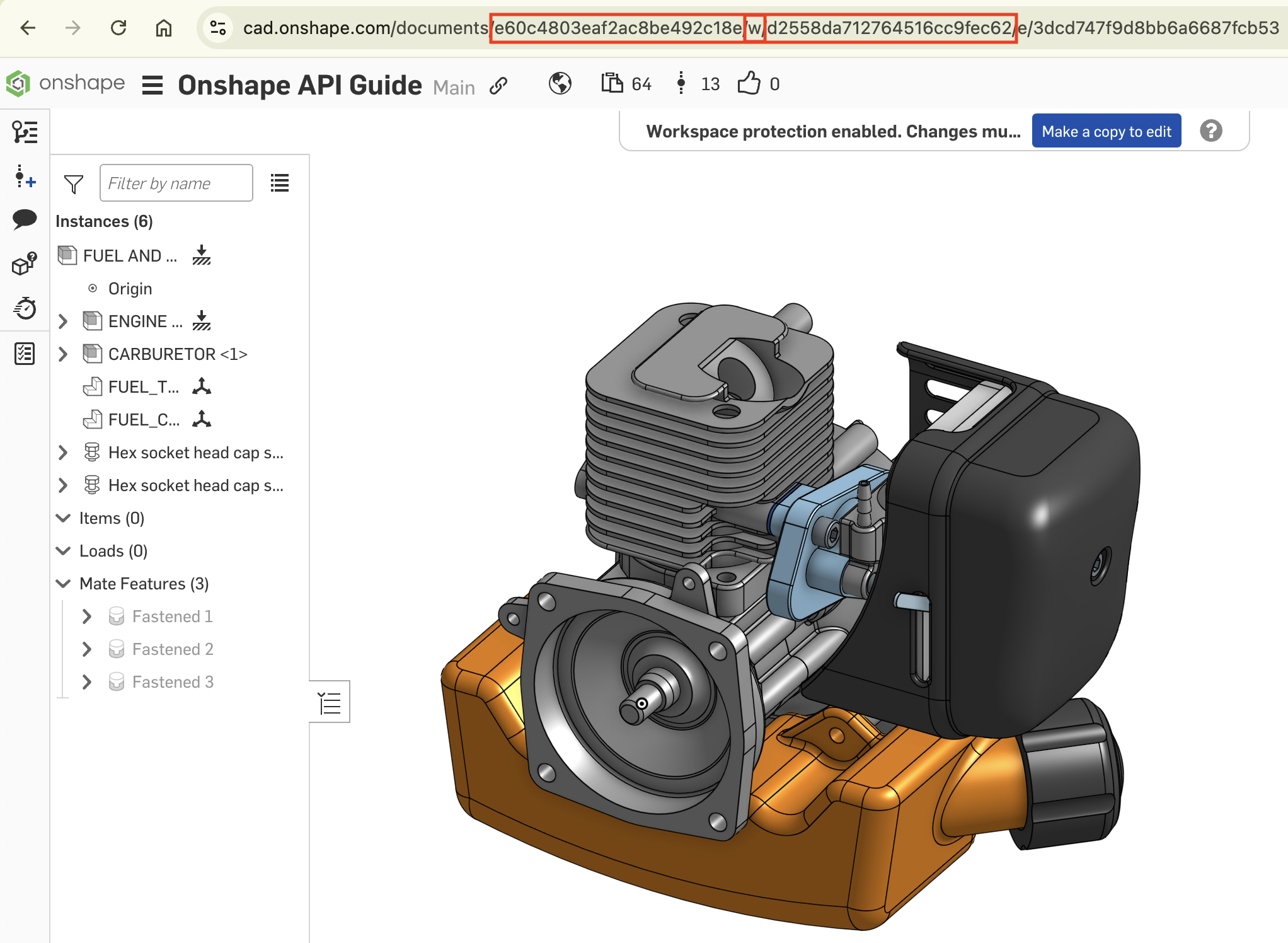
did: e60c4803eaf2ac8be492c18ewvm: wwid: d2558da712764516cc9fec62
Call the getElementsInDocument endpoint on the document and workspace:
curl -X 'GET' \
  'https://cad.onshape.com/api/v10/documents/d/e60c4803eaf2ac8be492c18e/w/d2558da712764516cc9fec62/elements' \
  -H 'Accept: application/json;charset=UTF-8; qs=0.09' \
  -H 'Authorization: Basic {credentials}' \
  -H 'Content-Type: application/json;charset=UTF-8; qs=0.09'
import requests import json auth = (access_key, secret_key) # See Authentication guide headers = { 'Accept': 'application/json;charset=UTF-8;qs=0.09', 'Content-Type': 'application/json;charset=UTF-8; qs=0.09' } api_url = "https://cad.onshape.com/api/v10/documents/d/e60c4803eaf2ac8be492c18e/w/d2558da712764516cc9fec62/elements" queryParams = {} response = requests.get(api_url, params=queryParams, auth=auth, headers=headers) print(json.dumps(response.json(), indent=4))The response returns a code block for each tab in the document. Confirm that your response includes the tab names from the document, including
ENG_BLOCKandCRANK:[ { "name": "ENG_BLOCK", "id": "9ff7abbba6852dc4d0bce252", "type": "Part Studio", "elementType": "PARTSTUDIO", ... }, { "name": "CRANK", "id": "6bed6b43463f6a46a37b4a22", "type": "Part Studio", "elementType": "PARTSTUDIO", ... } ... ]
Create a version
Make a copy of this public document, and create a new version in it.
Endpoint
POST /api/v10/documents/d/{did}/versions
Request Body
{
  "documentId": "{did}",
  "name": "newVersion1",
  "workspaceId": "{wid}"
}
Additional optional fields available. See the API Explorer for a full list.
Example
- Make a copy of this public document, and make a note of the new document and workspace IDs in the URL.
- Call the createVersion endpoint on the document ID from Step 1. You must also specify the document ID and workspace ID in the request body, along with a name for the version:
curl -X 'POST' \
  'https://cad.onshape.com/api/v10/documents/d/{did}/versions' \
  -H 'accept: application/json;charset=UTF-8; qs=0.09' \
  -H 'Content-Type: application/json;charset=UTF-8; qs=0.09' \
  -d '{
      "documentId": "{did}",
      "name": "newVersion1",
      "workspaceId": "{wid}"
      }'
import requests import json auth = (access_key, secret_key) # See Authentication guide headers = { 'Accept': 'application/json;charset=UTF-8;qs=0.09', 'Content-Type': 'application/json;charset=UTF-8; qs=0.09' } api_url = "https://cad.onshape.com/api/v10/documents/d/{did}/versions" queryParams = {} body = { "documentId": "{did}", "name": "newVersion1", "workspaceId": "{wid}" } response = requests.post( api_url, params=queryParams, json=body, auth=auth, headers=headers) print(json.dumps(response.json(), indent=4)) - Navigate to your document and open the Versions and history graph. Confirm that
newVersion1appears in the history.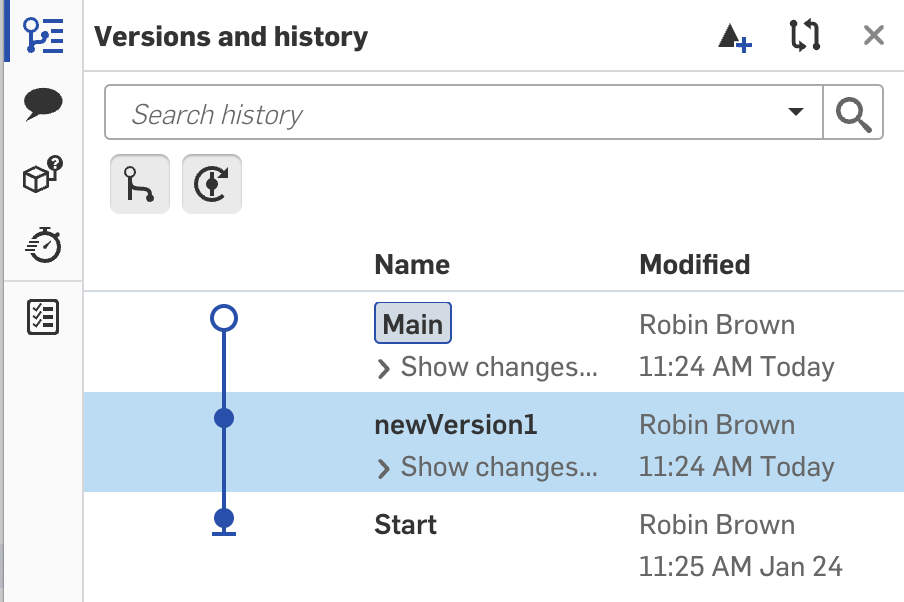
Get document versions
Get a list of all versions in a document. Complete the Create a version example above before beginning this one.
Endpoint
GET /api/v10/documents/d/{did}/versions
Query Parameters
{
  "offset": 0,
  "limit": 0
}
Example
- Complete the Create a version example above.
- Call the getDocumentVersions endpoint your document ID:
curl -X 'GET' \
  'https://cad.onshape.com/api/v10/documents/d/{did}/versions?offset=0&limit=0' \
  -H 'Accept: application/json;charset=UTF-8; qs=0.09' \
  -H 'Authorization: Basic {credentials}' \
  -H 'Content-Type: application/json;charset=UTF-8; qs=0.09'
import requests import json auth = (access_key, secret_key) # See Authentication guide headers = { 'Accept': 'application/json;charset=UTF-8;qs=0.09', 'Content-Type': 'application/json;charset=UTF-8; qs=0.09' } api_url = "https://cad.onshape.com/api/v10/documents/d/{did}/versions" queryParams = { "offset": 0, "limit": 0 } response = requests.get(api_url, params=queryParams, auth=auth, headers=headers) print(json.dumps(response.json(), indent=4)) - Scroll to the end of the response and confirm that you see the
newVersion1version you created:"documentId": "{did}", "thumbnail": null, "microversion": "{mid}", "parents": null, "name": "newVersion1", "id": "{vid}", "href": null
Delete a document
Delete a document. Complete the Create a document example above before beginning this one.
Endpoint
DELETE /api/10/documents/{did}
Query Parameters
{
  "forever": "false"
}
Example
- Complete the Create a document example above.
- Call the deleteDocument endpoint on the document ID from the Create a document tutorial:
curl -X 'DELETE' \
  'https://cad.onshape.com/api/v10/documents/{did}?forever=false' \
  -H 'Accept: application/json;charset=UTF-8; qs=0.09' \
  -H 'Authorization: Basic {credentials}' \
  -H 'Content-Type: application/json;charset=UTF-8; qs=0.09'
import requests import json auth = (access_key, secret_key) # See Authentication guide headers = { 'Accept': 'application/json;charset=UTF-8;qs=0.09', 'Content-Type': 'application/json;charset=UTF-8; qs=0.09' } api_url = "https://cad.onshape.com/api/v10/documents/{did}" queryParams = { "forever" : "false" } response = requests.delete( api_url, params=queryParams, auth=auth, headers=headers ) print(response) - Your console should return a 200 response. Return to your Onshape account and confirm that the document has been deleted.
Additional Resources
- API Explorer: Documents
- API Guide: API Explorer
- Onshape Help: Documents