Materials
This page describes the APIs Onshape provides for working with material libraries.
ℹ️ Onshape API Notes
- All Onshape API calls must be properly authenticated.
- For Enterprise accounts, replace
cadin URLs with your company domain. - Onshape IDs are written as:
{did}, {wvmid}, {eid}, {pid}, {otherId}. See Onshape API Intro for information on what these IDs mean and how to obtain them from your documents. - Variables for replacement are written as:
{variable1}or<variableTwo>. Never include the braces or angle brackets themselves with these variables. - Visit the Learning Center's Intro to the Onshape API course for additional instruction and videos.
Get the standard Onshape material library
Call the getLibrary endpoint on the standard Onshape Material Library: https://cad.onshape.com/documents/2718281828459eacfeeda11f/w/97628b48cc974c2681faacfc/e/6bbab304a1f64e7d640a2d7d
Endpoint
GET /materials/libraries/d/{did}/{wvm}/{wvmid}/e/{eid}
Params
did:2718281828459eacfeeda11fwid:97628b48cc974c2681faacfceid:6bbab304a1f64e7d640a2d7d
Example
curl -X 'GET' \
  'https://cad.onshape.com/api/v16/materials/libraries/d/2718281828459eacfeeda11f/w/97628b48cc974c2681faacfc/e/6bbab304a1f64e7d640a2d7d' \
      -H 'Accept: application/json;charset=UTF-8; qs=0.09' \
      -H 'Authorization: Basic CREDENTIALS' \
      -H 'Content-Type: application/json;charset=UTF-8; qs=0.09'
Get a custom material library
Call the getLibrary endpoint on a custom material library.
Endpoint
GET /materials/libraries/d/{did}/{wvm}/{wvmid}/e/{eid}
Example
- Create a
.csvfile with the following data. Make sure to include the headers in the first row of the file.Category Name Density Wood Ash, white 500 Wood Balsa 160 Wood Basswood 420 - Follow the Onshape Help Docs for importing a custom material library into an Onshape document.
- Call the
getLibraryendpoint on the document in which you imported the library:curl -X 'GET' \ 'https://cad.onshape.com/api/v16/materials/libraries/d/{did}/w/{wid}/e/{eid}' \ -H 'Accept: application/json;charset=UTF-8; qs=0.09' \ -H 'Authorization: Basic CREDENTIALS' \ -H 'Content-Type: application/json;charset=UTF-8; qs=0.09' - View the response and confirm that the three wood materials appear:
{
    "propertyDefinitions": [
        {
            "category": "Physical",
            "unitsChoices": [
                "lb/in^3",
                "kg/m^3"
            ],
            "displayUnits": "lb/in^3",
            "name": "DENS",
            "type": "REAL",
            "displayName": "Density",
            "units": "lb/in^3",
            "description": "Density"
        }
    ],
    "materials": [
        {
            "id": "knkoCnpG54jpomV9",
            "category": "Wood",
            "displayName": "Ash, White",
            "propertyValues": {
                "DENS": "500"
            }
        },
        {
            "id": "KFs2xUkZryPUnOom",
            "category": "Wood",
            "displayName": "Balsa",
            "propertyValues": {
                "DENS": "160"
            }
        },
        {
           "id": "puQQbVLoZ7b5kO9e",
            "category": "Wood",
            "displayName": "Basswood",
            "propertyValues": {
                "DENS": "420"
            }
        }
    ],
    "name": "Material Library 1",
    "displayName": "Material Library 1",
    "versioned": false
}
Update a custom material library
Update an existing material library via .csv file.
Endpoint
POST /materials/libraries/d/{did}/w/{wid}/e/{eid}/csv
Example
Complete the Get a custom material library example before starting this one.
Create a
.csvfile with the following data. Make sure to include the headers in the first row of the file.Category Name Density Wood Teak 640 Call the
updateLibraryendpoint on the document in which you added the library.In the Glassworks API Explorer, you can upload the
.csvfile directly in the UI.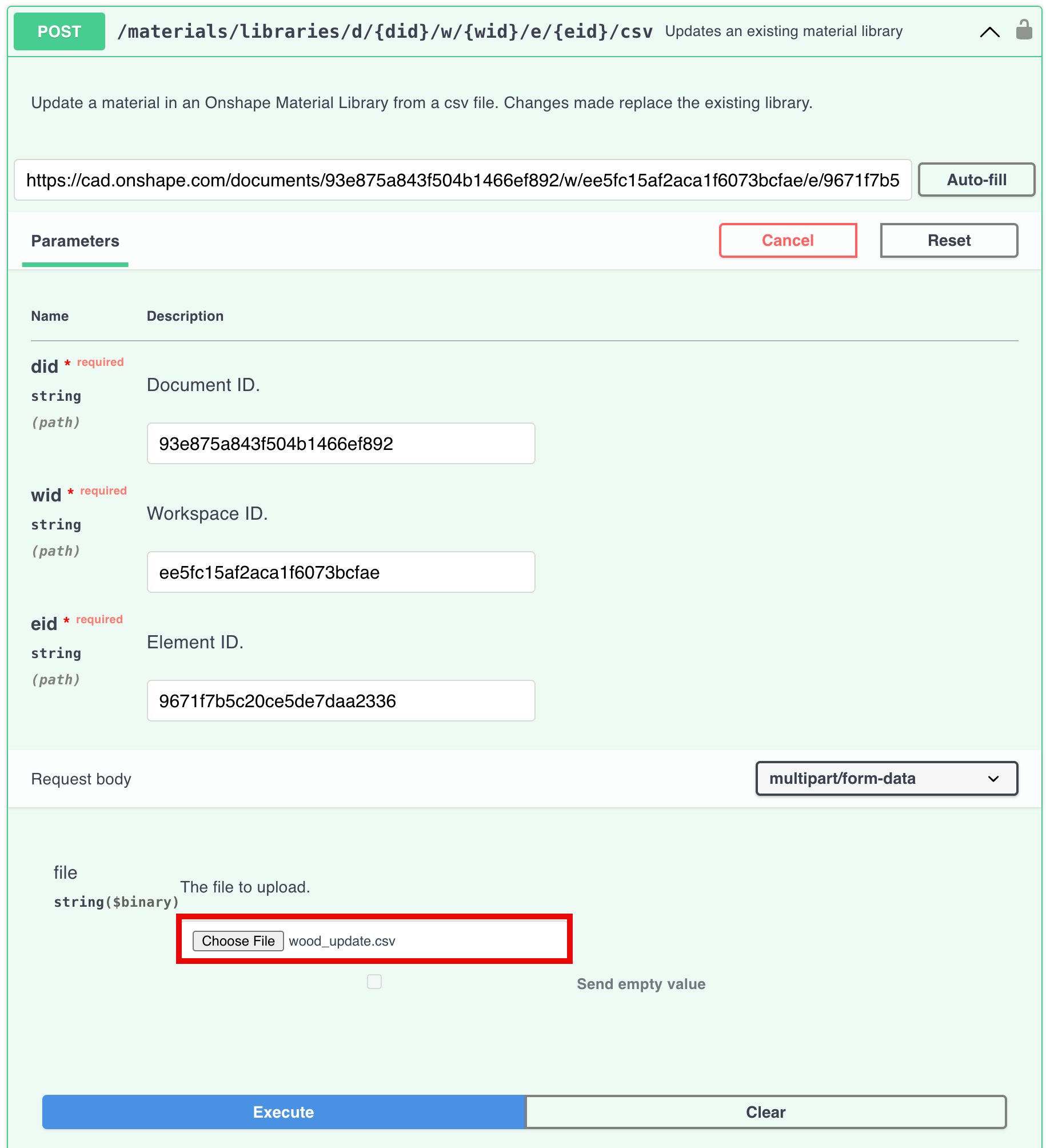
Call the
getLibraryendpoint on the document in which you imported the library again:curl -X 'GET' \ 'https://cad.onshape.com/api/v16/materials/libraries/d/{did}/w/{wid}/e/{eid}' \ -H 'Accept: application/json;charset=UTF-8; qs=0.09' \ -H 'Authorization: Basic CREDENTIALS' \ -H 'Content-Type: application/json;charset=UTF-8; qs=0.09'View the response and confirm that the
Teakmaterial has replaced the original three materials in the list:{ "propertyDefinitions": [ { "category": "Physical", "unitsChoices": [ "lb/in^3", "kg/m^3" ], "displayUnits": "lb/in^3", "name": "DENS", "type": "REAL", "displayName": "Density", "units": "lb/in^3", "description": "Density" } ], "materials": [ { "id": "x0IfPNuCAKkWUPpw", "category": "Wood", "displayName": "Teak", "propertyValues": { "DENS": "640" } } ], "name": "Material Library 1", "displayName": "Material Library 1", "versioned": false }