Webhooks
This page describes the Webhook APIs Onshape provides for working with notifications.
Notifications are delivered to an application as an HTTP POST with a JSON body, which includes information about the identity of the registration request and information specific to the event and notification message.
Webhooks are an alternative approach to polling; instead of your application continuously asking Onshape for new information, webhooks automatically send a notification from Onshape any time an event you are subscribed to occurs.
An application may register for notifications to a URL that uses either HTTP or HTTPS. If HTTPS is specified by the URL template, the notification server must supply a certificate that is signed by a certificate authority (CA) recognized by Onshape. Self-signed certificates (as well as certificates signed by unrecognized CAs) will be rejected, causing notification delivery to fail.
Webhooks can also have an additional level of authentication. See the Onshape Help: Webhooks page for more information.
ℹ️ Onshape API Notes
- All Onshape API calls must be properly authenticated.
- For Enterprise accounts, replace
cadin URLs with your company domain. - Onshape IDs are written as:
{did}, {wvmid}, {eid}, {pid}, {otherId}. See Onshape API Intro for information on what these IDs mean and how to obtain them from your documents. - Variables for replacement are written as:
{variable1}or<variableTwo>. Never include the braces or angle brackets themselves with these variables. - Visit the Learning Center's Intro to the Onshape API course for additional instruction and videos.
Events
Each type of event that an application may receive notifications for has a unique identifier known as the event type.
ℹ️ NOTES
Webhooks you create are automatically cleaned up after a period of inactivity. To prevent this cleanup, set isTransient=false when creating your webhook and unregister the webhook when it is no longer needed.
Supported event types
To view the full list of supported event types and their required request bodies:
- Go to the createWebhook endpoint in the Glassworks API Explorer.
- Click
Callbacks.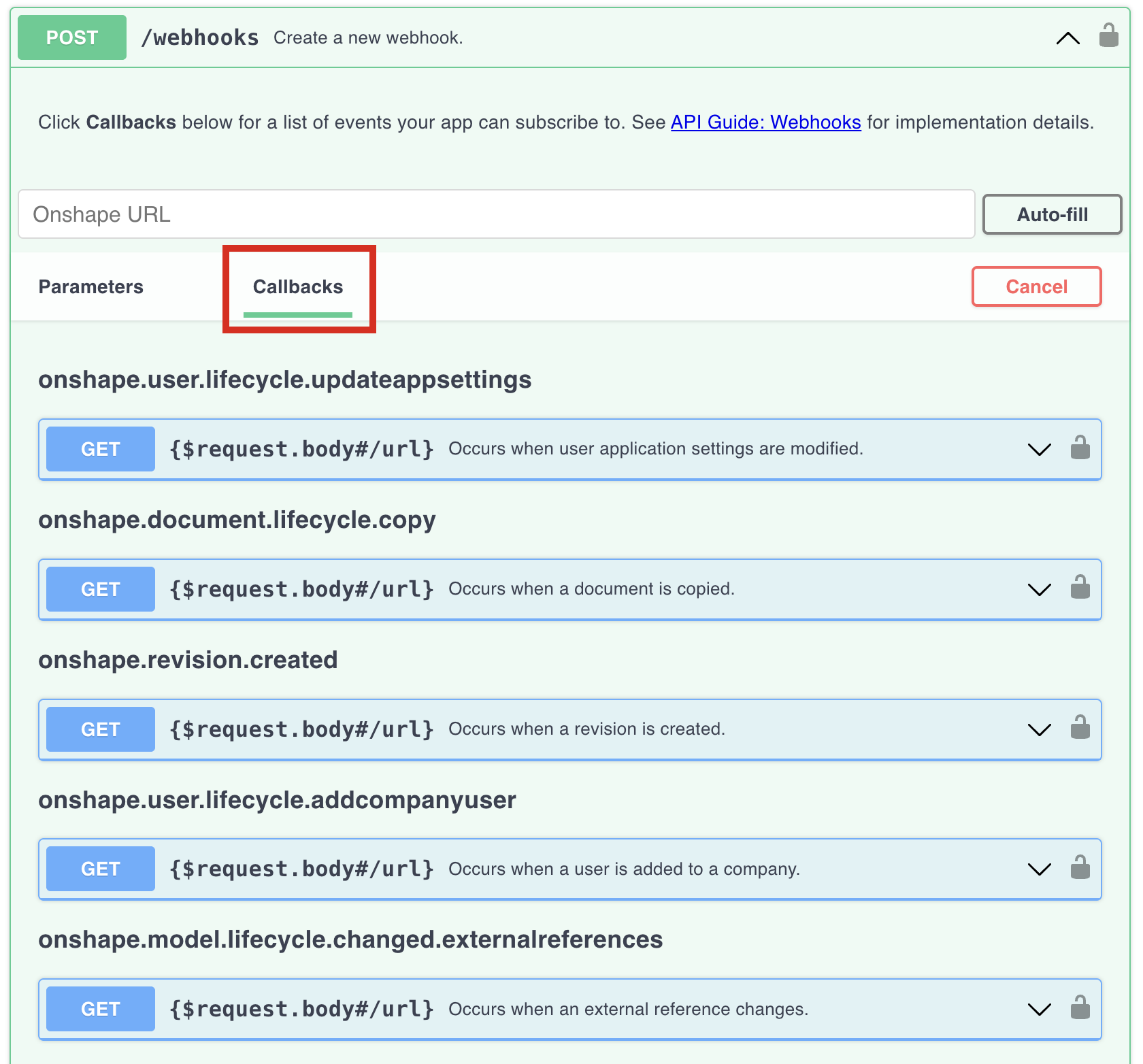
- Click a callback to expand or collapse the list. (Currently, you cannot expand or collapse a single callback in the API Explorer; click to expand all or collapse all.)
- View the required request body for the callback.
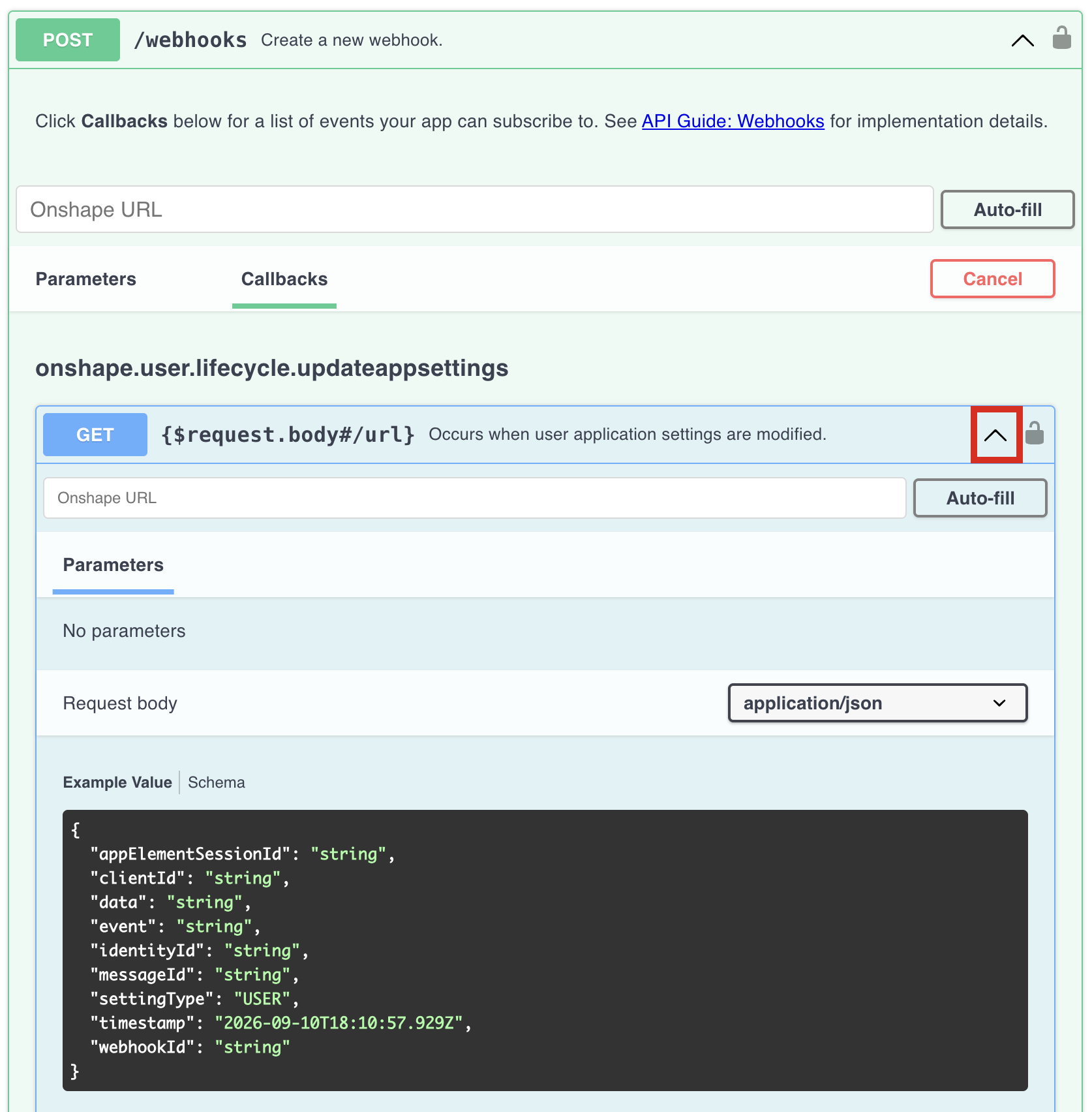
Webhook events
Use these events to monitor webhook changes. You do not need to register for these events; they are sent automatically when a webhook for another event type is registered, unregistered, or pinged.
webhook.register- Occurs in response to a notification registration API callwebhook.unregister- Occurs in response to a notification deregistration API callwebhook.ping- Occurs either:- In response to a request by an application to call the pingWebhook endpoint.
- As a post-registration validation initiated by Onshape
Registration requirements
These change based on the event. Some events include requirements not listed here (i.e., commentId for listening for comment updates).
companyId- Call GET /companies and get theid(NOTaddress.idorownerId) from the response.- You can instead provide the
documentIdof a document owned by the company, and thecompanyIdwill be inferred. - If registered for a
companyId, the event is registered for all present and future documents owned by the company. onshape.document.lifecycle.statechangerequiresdocumentIdinstead ofcompanyId.onshape.user.lifecycle.updateappsettingsrequiresclientIdinstead ofcompanyId. See Onshape Help: Managing OAuth Applications; obtain theOAuth client identifierfrom the app’sKeys and secrettab.
- You can instead provide the
scope: USER- An authenticated user can subscribe to their own comment events across documents, rather than for a document or company.- The
userIdmust be the authenticated user. - Call GET /users/sessioninfo to get your user ID.
- User-scoped webhooks accept only comment create, update, and delete events, with no document or resource filters.
- If the user is signed in with an enterprise,
companyIdis inferred from their signed in user, and should not be passed.
- The
events- Must be set to one of the supported event types.options.collapseEvents-trueorfalseurl- Must be provided to receive the webhook notificationsdocumentState- Required foronshape.document.lifecycle.statechangeonly. Must be one of:ACTIVE- Document is in a normal, usable state.TRASH- Document has been moved to the trash; user can move document back toACTIVEstate.DELETED- Document has been deleted; user cannot access document.
Example - companyId
{
  "companyId": "<company ID>",
  "events": [
    "onshape.document.lifecycle.created"
  ],
  "options": {
    "collapseEvents": false
  },
  "url": "https://sampleUrl.org"
}
Example - userId
{
  "scope": "USER",
  "userId": "<authenticated user ID>",
  "events": [
    "onshape.comment.create",
    "onshape.comment.update",
    "onshape.comment.delete"
  ],
  "url": "https://my-apps-callback-url"
}
Example Notifications
The "000000000000000000000000" strings represent string IDs.
webhook.register
{
  "timestamp": "2024-05-05T23:45:10.611-0500",
  "event": "webhook.register",
  "workspaceId": "000000000000000000000000",
  "elementId": "000000000000000000000000",
  "webhookId": "000000000000000000000000",
  "messageId": "000000000000000000000000",
  "data": "Some data",
  "documentId": "000000000000000000000000",
  "versionId":  "000000000000000000000000"
}
webhook.ping
{
  "timestamp": "2024-05-05T23:45:10.611-0500",
  "event": "webhook.ping",
  "workspaceId": "000000000000000000000000",
  "elementId": "000000000000000000000000",
  "webhookId": "000000000000000000000000",
  "messageId": "000000000000000000000000",
  "data": "Some data",
  "documentId": "000000000000000000000000",
  "versionId":  "000000000000000000000000"
}
onshape.model.lifecycle.changed
{
  "timestamp": "2024-05-05T23:46:29.284-0500",
  "event": "onshape.model.lifecycle.changed",
  "workspaceId": "000000000000000000000000",
  "elementId": "000000000000000000000000",
  "webhookId": "000000000000000000000000",
  "messageId": "000000000000000000000000",
  "data": "Some data",
  "documentId": "000000000000000000000000",
  "versionId":  "000000000000000000000000"
}
onshape.document.lifecycle.statechange
{
  "timestamp": "2024-05-05T23:46:29.284-0500",
  "event": "onshape.document.lifecycle.statechange",
  "workspaceId": "000000000000000000000000",
  "elementId": "000000000000000000000000",
  "webhookId": "000000000000000000000000",
  "messageId": "000000000000000000000000",
  "data": "Some data",
  "documentId": "000000000000000000000000",
  "versionId":  "000000000000000000000000",
  "documentState": "TRASH"
}
onshape.user.lifecycle.updateappsettings
{
  "timestamp": "2024-05-05T23:46:29.284-0500",
  "event": "onshape.user.lifecycle.updateappsettings",
  "workspaceId": "000000000000000000000000",
  "elementId": "000000000000000000000000",
  "webhookId": "000000000000000000000000",
  "messageId": "000000000000000000000000",
  "data": "Some data",
  "userId": "000000000000000000000000",
  "clientId":"000000000000000000000000"
}
onshape.model.translation.complete
{
  "timestamp": "2024-05-05T23:46:29.284-0500",
  "event": "onshape.model.translation.complete",
  "workspaceId": "000000000000000000000000",
  "elementId": "000000000000000000000000",
  "webhookId": "000000000000000000000000",
  "messageId": "000000000000000000000000",
  "data": "Some data",
  "documentId": "000000000000000000000000",
  "userId": "000000000000000000000000",
  "translationId": "000000000000000000000000"
}
onshape.comment.create
{
  "timestamp": "2024-05-05T23:46:29.284-0500",
  "event": "onshape.comment.create",
  "workspaceId": "000000000000000000000000",
  "elementId": "000000000000000000000000",
  "webhookId": "000000000000000000000000",
  "messageId": "000000000000000000000000",
  "documentId": "000000000000000000000000",
  "commentId": "000000000000000000000000"
}
Endpoints
Webhook notifications allow an application to register to receive notifications of certain events that occur within the Onshape environment. To receive a notification, an application must expose an endpoint that Onshape can call.
- Webhook/getWebhooks
curl -X 'GET' \ 'https://cad.onshape.com/api/v6/webhooks?user={uid}&offset=0&limit=20' \ -H 'Accept: application/json;charset=UTF-8; qs=0.09' \ -H 'Authorization: Basic CREDENTIALS' - Webhook/createWebhook
curl -X 'POST' \ 'https://cad.onshape.com/api/v6/webhooks' \ -H 'Accept: application/json;charset=UTF-8; qs=0.09' \ -H 'Authorization: Basic CREDENTIALS' \ -H 'Content-Type: application/json;charset=UTF-8; qs=0.09' \ -d '{ "events": [ "eventType" // See the [Events](#events) section above for valid event types. ], "options": { "collapseEvents": true | false }, "url": "https://sampleUrl.org" //Other parameters may be required. See the [Events](#events) section above. }' - Webhook/getWebhook
curl -X 'GET' \ 'https://cad.onshape.com/api/v6/webhooks/webhookId' \ -H 'Accept: application/json;charset=UTF-8; qs=0.09' \ -H 'Authorization: Basic CREDENTIALS' - Webhook/updateWebhook
curl -X 'POST' \ 'https://cad.onshape.com/api/v6/webhooks/webhookId' \ -H 'Accept: application/json;charset=UTF-8; qs=0.09' \ -H 'Authorization: Basic CREDENTIALS' \ -H 'Content-Type: application/json;charset=UTF-8; qs=0.09' \ -d '{ "id": "webhookId", "options": { "collapseEvents": true | false } }'- Note that the webhook
idmust be sent in both the URL and the request body.
- Note that the webhook
- Webhook/unregisterWebhook
curl -X 'DELETE' \ 'https://cad.onshape.com/api/v6/webhooks/{webhookId}?blockNotification=false' \ -H 'accept: application/json;charset=UTF-8; qs=0.09' \ -H 'Authorization: Basic CREDENTIALS' - Webhook/pingWebhook
  curl -X 'POST' \
    'https://cad.onshape.com/api/v6/webhooks/{webhookId}/ping' \
    -H 'Accept: application/json;charset=UTF-8; qs=0.09' \
    -H 'Authorization: Basic CREDENTIALS'
Sample Workflows
ℹ️ NOTES
- This page provides sample code as curl commands.
- Replace
000000000000000000000000strings with your IDs.
Create a webhook
An application registers for event notification by:
- Making a REST call to the Onshape web service
- Providing a URL to notify
- Providing the required parameters for the event types to be registered
If the registration request is well-formed, the registration API call returns information about the registration, including a unique id string that identifies the webhook registration. This corresponds to the webhookId field in other endpoints. No de-duplication of notification registrations is performed by the API. Each registration call will yield a new registrationId, even if the parameters are identical to those passed in a prior call.
Shortly after an application calls the notification registration API, Onshape will make an asynchronous trial notification call to the URL generated from the URL template with an event type of webhook.register to test if the application notification server is accessible. If the trial notification delivery fails to return an HTTP 200 status code, the notification registration is cancelled. The trial notification is usually delivered after the notification registration has been received by the application. However, variations in network delays may result in the trial notification occurring before the response is received and processed by the application, so the notification handler should be ready to process notifications before the registration call is made.
In this example, we use a webhook to send information from Onshape to another server. You need a URL for Onshape to send notifications to, and a way to view the messages sent with those notifications.
- Open an Onshape document, or create a new one.
- In this example, we want to receive a notification from Onshape any time a new version is created in the specified document. For this, we’ll use
onshape.model.lifecycle.createversionas ourevent. - The event type requires one parameter. We’ll use our
documentIdfor this field (shown as000000000000000000000000in the example below). - All event types require specifying
trueorfalsefor theoptions.collapseEventsfield. In this case, set the field tofalse. - Next, we need the URL to send the notification to. You must provide your own URL to receive notifications here.
- Confirm your createWebhook call looks like this (substitute your own authorization credentials, document ID, and URL), then make the call.
  curl -X 'POST' \
    'https://cad.onshape.com/api/v6/webhooks' \
    -H 'Accept: application/json;charset=UTF-8; qs=0.09' \
    -H 'Authorization: Basic CREDENTIALS' \
    -H 'Content-Type: application/json;charset=UTF-8; qs=0.09' \
    -d '{
        "documentId": "000000000000000000000000",
        "events": [
          "onshape.model.lifecycle.createversion"
        ],
        "options": {
          "collapseEvents": false
        },
        "url": "https://sampleUrl.org"
    }'
- In your application, confirm that you received the
webhook.registerevent from Onshape. - In Onshape, create a new version in your document.
- In your application, confirm that you received the
onshape.model.lifecycle.createversionevent from Onshape. Make note of theidin the response; use this as yourwebhookIdin subsequent examples.
Get webhook info
- Complete the Create a webhook steps above to obtain a
webhookId. - Create your getWebhook call. substitute your own authorization credentials and
webhookId(shown as000000000000000000000000in the example below), then make the call.
  curl -X 'GET' \
    'https://cad.onshape.com/api/v6/webhooks/000000000000000000000000' \
    -H 'Accept: application/json;charset=UTF-8; qs=0.09' \
    -H 'Authorization: Basic CREDENTIALS' \
- Confirm that the
eventin the response isonshape.model.lifecycle.createversion.
Update a webhook
- Complete the Create a webhook steps above to obtain a
webhookId. Note that in the same response, the webhookdescriptionisnull. - Create your updateWebhook call. In this example, ww update the webhook’s
description. Substitute your own authorization credentials andwebhookId(shown as000000000000000000000000in the example below in both the URL and request body). Then make the call.
  curl -X 'POST' \
    'https://cad.onshape.com/api/v6/webhooks/000000000000000000000000' \
    -H 'accept: application/json;charset=UTF-8; qs=0.09' \
    -H 'Authorization: Basic CREDENTIALS' \
    -H 'Content-Type: application/json;charset=UTF-8; qs=0.09' \
    -d '{
          "id": "000000000000000000000000",
          "description": "Send a notification each time a document version is created.",
          "options": {
            "collapseEvents": false
          }
      }'
- Confirm in the response that the webhook
descriptionis set toSend a notification each time a document version is created.
Delete a webhook
When an application no longer needs to be notified of changes specified by a particular notification registration, it should normally deregister the notification request. Deregistration is performed by making an HTTP that specifies the hook to deregister. Onshape will attempt to call the deregistered hook with an event type of webhook.unregister as validation that the deregistration is complete. If the application does not deregister the webhook, Onshape will continue delivering notifications until the the application either returns an error in response to a notification for the webhook or fails to respond at all for an extended period of time.
- Complete the Create a webhook steps above to obtain a
webhookId. - Create your deleteWebhook call. substitute your own authorization credentials and
webhookId(shown as000000000000000000000000in the example below), then make the call.
  curl -X 'DELETE' \
    'https://cad.onshape.com/api/v6/webhooks/000000000000000000000000' \
    -H 'Accept: application/json;charset=UTF-8; qs=0.09' \
    -H 'Authorization: Basic CREDENTIALS=' \
- In your application, confirm that you received the
webhook.unregisterevent from Onshape. - In Onshape, create a new version in your document.
- In your application, confirm that no new events have been received.